What Happens to Your Business When the Internet Drops
Ask a business owner what happens if the internet goes down and the usual answer is that people would catch up on paperwork for a couple of hours. Then you start listing what is actually connected, and the answer changes.
The phone system is cloud-hosted, so the phones are dead and callers hear nothing. EFTPOS terminals route over the network, so you cannot take payment. Email is in the cloud. So is the accounting system, the CRM, the rostering, the file storage and the booking calendar. The security cameras have stopped recording offsite. The door access system may or may not still let staff in.
Two decades ago an internet outage meant you could not send email. Today, for most businesses, it means you cannot trade.
Work out what actually stops
Before spending anything, spend twenty minutes on an inventory. Walk through a normal trading day and mark every system that needs the connection to work:
- Phones, if you are on a hosted or VoIP service — which is now most businesses.
- Card payments, unless your terminals have their own mobile connection.
- Email, calendars and file storage in Microsoft 365 or Google Workspace.
- Line-of-business software: accounting, inventory, bookings, dispatch, practice management.
- Anything a customer touches — your website, online ordering, self-service kiosks.
- Offsite backups and cloud camera recording, which fail silently rather than obviously — a gap worth checking against your backup monitoring arrangements.
Then attach a number. If everything on that list stops for four hours, what does it cost in lost revenue, idle staff and customers who go elsewhere? That figure is the budget you are working with, and for most businesses it is considerably larger than the cost of preventing it.
What business-grade internet buys that residential does not
Plenty of small businesses run on a residential-grade service because the speeds look identical and the price is lower. The speeds often are identical. What differs is everything around them.
- A committed restoration target. Residential faults are handled on a best-effort basis. Business services carry a defined restoration timeframe, which is the difference between a fault being fixed in hours and being fixed when it reaches the front of the queue.
- Priority fault handling, including access to support that can escalate rather than only read from a script.
- Symmetrical or higher upload on some services, which matters for cloud backups, video calls and sending large files — the same asymmetry problem homes face, but with commercial consequences.
- A static IP address, needed for VPN endpoints, hosted services and remote access to on-site equipment.
- Contention commitments, so you are sharing capacity with fewer users and evening congestion is not your problem.
The honest framing: you are not buying more speed, you are buying a shorter and more predictable outage. Getting the right service for the site is part of what network support should be advising on rather than something you work out alone. Whether that is worth the premium comes straight back to the number you calculated above.
Failover, and what "automatic" should mean
A service level agreement shortens an outage. It does not prevent one. If trading through an outage matters, you need a second path to the internet that takes over on its own.
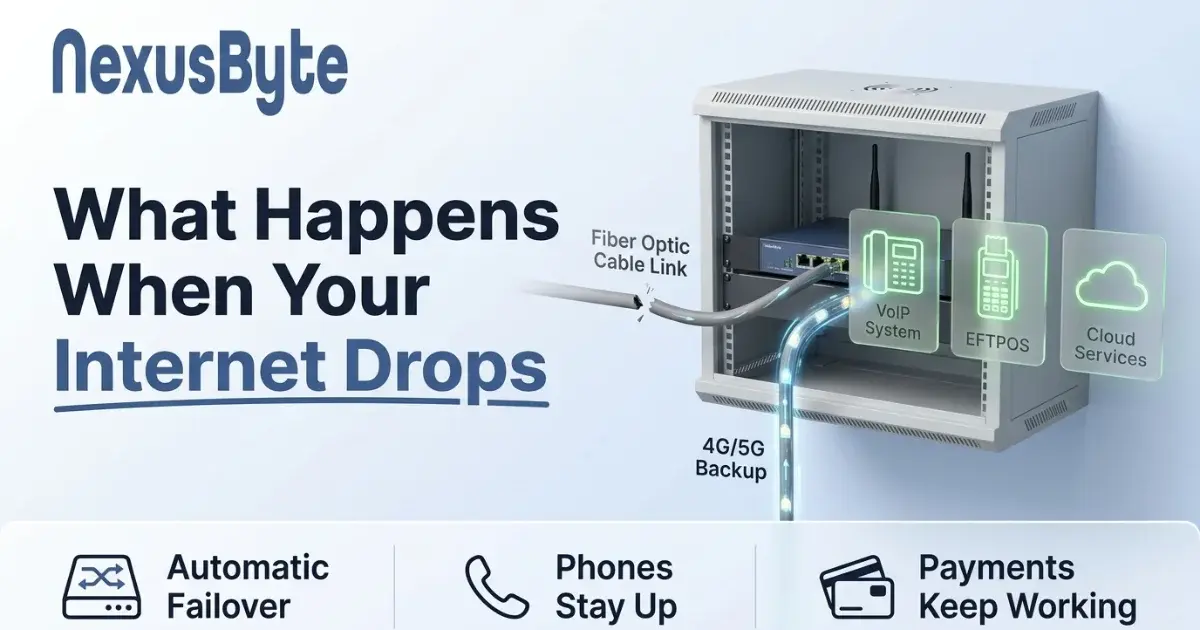
For most small and mid-sized businesses this means a router with dual WAN capability and a mobile broadband connection as the backup. The router monitors the primary link continuously and, when it fails, moves traffic to the mobile service. Done properly the switch takes seconds, and for most staff the only symptom is a video call that hiccups once.
A few details separate an arrangement that works from one that merely exists:
- It must fail over on quality, not just on link loss. A connection that is technically up but unusable — heavy packet loss, latency through the roof — is the common real-world failure, and a router watching only for a dead link will sit on it happily.
- It must fail back automatically once the primary recovers, or you will discover months later that you have been quietly running on mobile data.
- Know what the backup can carry. Mobile broadband will not sustain what a full fibre service does. Decide in advance what matters — phones and payments almost certainly, large cloud syncs almost certainly not — and prioritise accordingly so the backup is not swamped by a backup job.
- Watch the data allowance. A backup SIM that is never used until the day it is used all day can produce an unpleasant bill. Usage on the backup link is one of the things network monitoring should be watching for you.
Two services, one point of failure
This is the mistake that undoes otherwise sensible planning. A business signs a second internet service from a different provider, believing it now has redundancy. Both services arrive over the same physical infrastructure, into the same building, through the same pit in the street. When a contractor puts a backhoe through that pit, both fail together.
Genuine redundancy needs diversity in the physical path, not just in the branding on the invoice. In practice, for most businesses, that means the backup should use a different technology entirely — which is exactly why mobile is the usual answer. It arrives by radio rather than through the same conduit.
It is worth asking the same question about power. A failover arrangement that depends on a router, a modem and a switch all being powered will not help during a blackout unless those devices are on a UPS. A small uninterruptible supply for the network rack is inexpensive and turns a power flicker into a non-event. Where the whole rack is looked after under managed network services, this is the kind of detail that gets picked up before it matters.
The parts people forget
Two dependencies routinely get overlooked until the day they matter.
Phones. If your phone system is hosted, your published business number stops working during an outage, and customers hear ringing that never answers or a dead line. Most hosted providers can divert to mobile numbers automatically when the service is unreachable, but this has to be configured in advance. Doing it during an outage is difficult, because the portal you would use to configure it is on the internet you no longer have.
Payments. Confirm whether your EFTPOS terminals fall back to a mobile network on their own. Many do; some are network-only. A retail or hospitality business that cannot take payment is closed regardless of whether the lights are on, and this is worth knowing before you find out.
Test it, or you do not have it
An untested failover is a theory. The test is simple and takes ten minutes: unplug the primary connection during a quiet period and watch what happens.
Check that traffic moves across, how long it takes, whether calls survive or drop, whether payment terminals keep working, and what remains broken. Then plug it back in and confirm it returns to the primary. Do this when you install it, and again once a year, because a SIM can expire, a plan can change, and a router firmware update can quietly reset a setting.
Write down what you learn, including what does not work, and tell your staff what to expect. Everyone knowing that phones divert to a mobile during an outage is worth more than most technical controls.
Getting it right for your business
Not every business needs this. If a few hours offline costs you very little, the honest recommendation is to skip failover and put the money elsewhere. But if you take payments, answer phones, or have staff whose work stops when the connection does, the arithmetic usually settles the question quickly.
If you would like it designed and tested properly, our Sydney team can assess what actually depends on your connection, specify a failover arrangement that matches it, and prove it works before you are relying on it. Connectivity is one part of a wider picture, and our guide to managed IT versus break-fix covers how the rest of it gets looked after.