

PC & Desktop Repair Services in Sydney
Businesses and home users across Sydney rely on NexusByte for desktop and PC repair that's fast, reliable and done right the first time. Whether it's an office workstation that won't boot or a family computer that's slowed to a crawl, we bring accuracy, speed and long-term reliability to every job.
Our technicians handle the full spectrum: monitor failures and display replacement, power supply replacement for a PC not turning on, desktop overheating repair, and component-level motherboard work. Desktop data recovery is available too, with strict privacy handling, so a failed drive doesn't have to mean lost files for your business or household.
Rather than patch symptoms and send you on your way, we repair desktops properly so problems stay fixed. For desktop computer repair near you, choose a Sydney-based team that serves companies and households alike — business-grade diagnostics, clear communication at every step, and machines returned ready for the long haul.
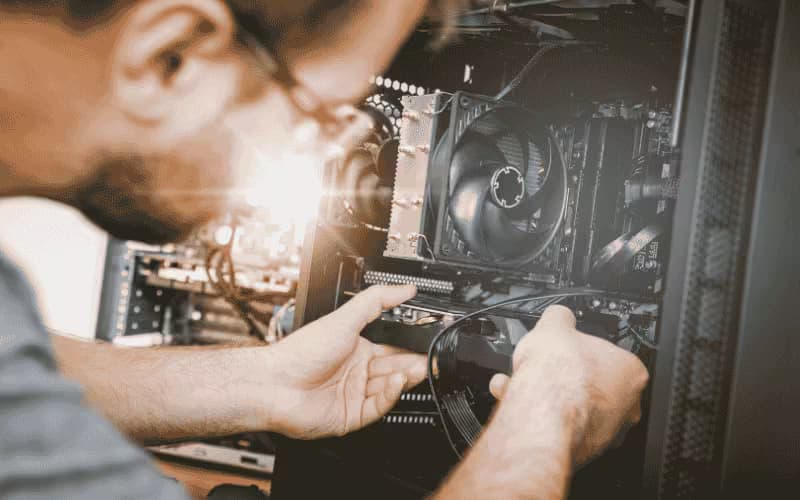
Our PC and desktop repair services include:
Monitor replacement and display repairPower supply replacement and fault diagnosisCooling repairs and data recovery servicesPickup and drop-off for busy professionals
Trusted PC & Desktop Repair Specialists in Sydney
NexusByte provides professional desktop computer repair services for all major brands.
We support Dell, HP, Lenovo, ASUS, Acer and custom-built PCs with genuine parts, experienced technicians, and clear pricing. We do not upsell. We do not guess. We diagnose first, then repair.
Genuine and OEM-grade parts
Experienced desktop repair technicians
Business-grade diagnostics, not retail shortcuts
Repairs designed for long-term reliability
Clear communication at every step
Secure handling of business and personal data
Sydney-based technicians and support you can trust.
Built for All Brands. Engineered for Reliability.
NexusByte provides professional PC and desktop repair services for all major brands across Sydney and surrounding areas.
Dell desktops
HP desktops
Lenovo desktops
ASUS desktops
Acer desktops
Custom-built PCs
Gaming PCs
Office workstations
Every desktop repair is completed with quality parts and a clear diagnosis.
Our promise on every desktop repair
Power supplies, failing drives, overheating and corrupted Windows installs make up most desktop faults, and each has a known fix. We diagnose for free, quote one price, and keep your data intact through the repair.
Free Diagnostic

Fixed Quote

No Fix, No Fee

Same Day Service

Your PC comes back tested under load, not just switched on.
Request a Free QuoteBuilt for results
What Our Clients Say
Businesses and individuals trust NexusByte for desktop repair and service because we fix issues properly the first time.
Honest diagnostics
Fast turnaround
Clear pricing
Reliable outcomes
Clients value our commitment to quality and transparency.
Our PC & Desktop Repair Process
A simple, transparent process designed to reduce downtime.
1. Diagnosis
2. Clear Quote
3. Professional Repair
4. Testing & Quality Check
5. Collection or Delivery
6. Documentation & Warranty
Our PC & Desktop Repair Services in Sydney
Monitor & Display Repair & Replacement
Broken, faulty monitor repair and replacement for all brands.
Includes:
- Cracked monitor screen repair
- Broken display repair
- Monitor repair service for business devices
- Full monitor replacement in Sydney
Power Supply Repairs
We specialise in desktop power supply repair and replacement.
Includes:
- PC not turning on
- Random shutdowns
- Power supply failure
- Desktop power supply replacement
Cooling & Thermal Repairs
Fast cooling system repair using quality components.
Includes:
- CPU fan replacement
- Overheating issues
- Dell desktop cooling repair
- HP desktop fan replacement
- ASUS desktop thermal repair
- Loud fan noise and cooling faults
Power & Boot Issues
If your desktop is not powering on or not booting, we diagnose the full power path.
Includes:
- HP desktop power issues
- Dell desktop not turning on
- Lenovo desktop boot failure
- PC not turning on
- Loose power connections
- Power button faults
Desktop Case & Tower Repair
Physical damage affects performance and safety.
Includes:
- Desktop case repair
- Tower casing repair
- Repair damaged desktop case
- Dell desktop case repair
- HP desktop casing repair
- Desktop case repair near me services in Sydney
Motherboard & Internal Repairs
Component-level desktop motherboard repairs for advanced faults.
Includes:
- Power rail issues
- Short circuits
- Liquid damage assessment
- Overheating or loud fan noise
Data Recovery Services
Professional desktop data recovery with strict privacy handling.
Includes:
- Recovery from failed SSDs and hard drives
- Data recovery from desktops not turning on
- Recovery after operating system crashes or corruption
- Accidental file deletion and formatted drives
- Virus or ransomware-related data loss
- Data extraction from physically damaged desktops
Software & Performance Issues
Not all problems are hardware-related.
Includes:
- Software crashes
- Slow performance
- Operating system failures
- Driver conflicts
- Security cleanup
- Virus and malware removal
Port, GPU & Hardware Upgrades
Wear and tear causes long-term damage if ignored.
Includes:
- USB, HDMI, and display ports
- Graphics card replacement
- RAM and storage upgrades
- Hard drive and SSD replacement
Liquid Damage & Cooling Repairs
Spills and overheating can cause serious damage. We assess liquid exposure and fix fan or cooling issues before they lead to failure.
Includes:
- Desktop liquid damage assessment and repair
- Water damage desktop repair Sydney
- Desktop fan replacement and cleaning
- Overheating and thermal paste replacement

Why Choose Us
Why NexusByte for PC & Desktop Repair Services
- Experienced desktop repair technicians
- Business-grade diagnostics, not retail shortcuts
- Repairs designed for long-term reliability
- Clear communication at every step
- Secure handling of business and personal data
- Sydney-based technicians and support
Genuine and OEM-grade parts for every repair.
What Is a PC & Desktop Repair Service and Who Needs One?
A PC and desktop repair service diagnoses and fixes tower computers and their monitors — covering power supplies, boot failures, cooling and overheating, motherboard faults, ports, software problems and data recovery. It is for Sydney businesses and home users running Dell, HP, Lenovo, ASUS, Acer or custom-built machines that have slowed, failed or started misbehaving.
Desktops fail differently from laptops. They live longer, swallow more dust, and their faults tend to creep — a fan grows louder over months, shutdowns become slightly more frequent — until one morning the machine will not start at all.
The upside is that desktops are unusually repairable. Modular parts mean a failed power supply, drive or graphics card can be replaced individually, which is why a well-serviced desktop can outlast several laptops. Gaming towers inherit the same advantage while wearing their parts far harder, and are handled by our gaming PC repair service.
Warning Signs Your Desktop Needs Attention
Most desktop failures announce themselves early. These are the symptoms worth acting on before they become data loss or a dead machine:
- Random shutdowns or restarts — often a power supply losing stability, or overheating
- Loud or grinding fan noise — worn bearings or dust choking the cooling path
- The PC not turning on at all — a fault anywhere along the power path, from button to board
- Monitor flicker, lines or a blank display — cable, graphics card or the monitor itself
- Progressive slowdown and freezes — a failing drive, malware, or operating system corruption
- USB, HDMI or audio ports that stop responding — wear, damage or board-level faults
None of these fix themselves. A failing power supply in particular can take the motherboard and drives with it when it finally lets go, turning a modest repair into a major one with data recovery on top.
Hardware Fault or Software Problem? Why Diagnosis Comes First
Desktop faults split into hardware, software and a deceptive middle ground where one masquerades as the other. A machine that crashes at random might have failing RAM, an overheating CPU, a corrupted operating system or a malware infection — four completely different repairs with four different price tags.
That is why we run business-grade diagnostics rather than retail-counter shortcuts. Testing the power path, checking drive health, reviewing thermals and inspecting the software layer takes longer than swapping the first suspicious part, but it means the fix addresses the actual fault.
Software work is a genuine part of desktop repair, not an afterthought: crashes, driver conflicts, operating system failures, security cleanup and virus and malware removal all sit alongside the hardware services.
What Affects the Cost of a Desktop Repair in Sydney?
Cost tracks three things: the part, the labour and the data. On parts, a case fan or power supply swap is straightforward, while a damaged monitor may be worth repairing or better replaced — and we will tell you which, honestly. Motherboard work is usually the most involved, because faults like short circuits and damaged power rails call for component-level repair.
On labour, liquid damage assessment and recovery from failed or physically damaged drives take methodical time. On data, the recovery scope depends on how the loss happened — deletion, formatting, corruption and ransomware each behave differently.
Every job begins with diagnosis and a clear quote, and if replacement genuinely beats repair we say so. Often the smart middle option is a targeted hardware upgrade — a new SSD, more RAM or a graphics card swap that renews the machine for a fraction of replacement cost.
Desktop Repairs for Sydney Businesses: Downtime Is the Real Cost
For a business, a dead workstation costs more in lost hours than in repair fees. That is why the process is built around predictability: pickup and drop-off for busy professionals, clear communication at every step, and testing plus a quality check before any machine goes back on a desk.
Business and personal data is handled securely throughout, and every repair comes with documentation and warranty — useful for asset registers as much as peace of mind. Where equipment has been damaged by surges, storms or accidents, we can also prepare insurance reports to support your claim.
The cheapest desktop repair is the one you never need. Scheduled computer maintenance — dust removal, thermal checks, update management and drive health monitoring — catches most of the failures above while they are still minor. To get a machine assessed, book a repair or contact our Sydney team.
Our Insights
Latest Computer Repairs & Technology Insights





Client Reviews
What customers say about our repair work
Three of the reviews our clients have left on Google. The full set, as written, is on our reviews page.
Highly recommended, they go out of their way to provide old fashioned service
Laith did a great job on upgrading my iMac so I don't have to buy a new model. Very knowledgeable about all things IT. 👍
It took Laith only minutes to find the problem with my laptop and address it so that I could go safely back to work. I cannot recommend Laith and NexusBytes enough.
FAQs
Frequently Asked Questions
Do you offer PC and desktop repair services near me in Sydney?
How much does monitor repair or replacement cost?
Can you recover data from a damaged desktop?
Do you repair power supply issues?
How long do most desktop repairs take?
Can you fix desktop cooling and overheating issues?
How much does a power supply replacement cost?
Is it cheaper to repair or buy a new desktop?
What is the most expensive part of a desktop to repair?
How much does it cost to repair a desktop?
Get in touch
Desktop PC not starting, slow or noisy?
Book a free diagnosis and we will find the fault, image your data before any risky work and give you repair, upgrade and replacement costs side by side.
Book onlineNot ready to book? Ask a question and we reply within two business hours.