

Hard Drive Data Recovery | Failed Drive Recovery Sydney
A drive that clicks, disappears from your computer or refuses to mount is not necessarily the end of your data. NexusByte provides professional hard drive data recovery in Sydney, retrieving files from failed and damaged drives that other approaches have given up on, with secure handling of your media at every stage of the job.
We handle mechanical failure, logical errors, corrupted file systems and overwritten data across internal and external drives from all major brands. Our process is deliberately careful: diagnose the fault first, create a secure image of the drive, then extract your data from that image rather than stressing failing hardware and risking what is left.
You get straight answers before any work begins, and on quoted jobs it is no recovery, no fee, so the risk sits with us rather than with you. From a portable drive dropped on concrete to a laptop disk that died overnight, our failed drive recovery service is built to get your files back.
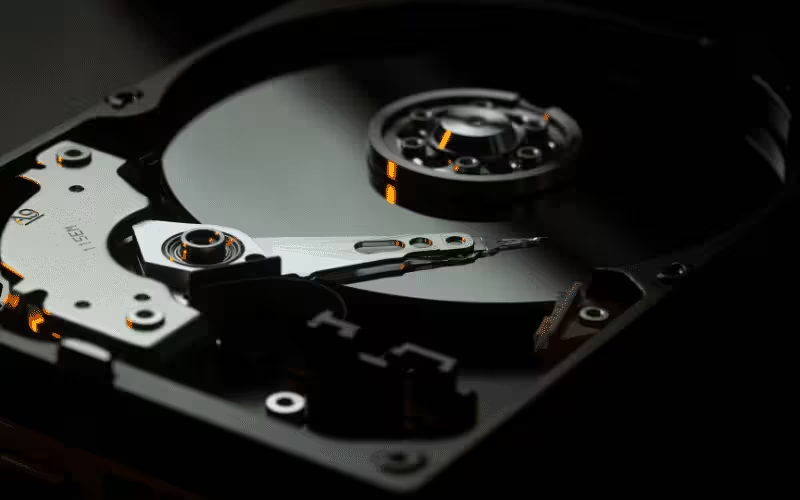
Our hard drive data recovery includes:
Mechanical and logical recoveryAll major drive brands and typesSecure imaging and extractionNo recovery, no fee (quoted jobs)
Trusted Hard Drive Data Recovery
We recover data from failed and damaged hard drives.
We use professional imaging and recovery techniques to retrieve your data from failed drives. Secure handling, clear quotes and no recovery no fee on quoted recovery work.
Diagnosis
Imaging
Recovery
Verification
Secure
No fee if no recovery
Professional. Secure. No recovery, no fee.
Built for Data. Engineered for Recovery.
NexusByte offers data management and recovery services that protect your information and restore it when needed.
Backup and recovery
Data migration
Disaster recovery
Cloud backup
Data security
Compliance and retention
Every data management solution is built for reliability, security, and business continuity.
Your Data, Protected. Guaranteed.
We safeguard and recover your data with clear pricing and a no-risk promise on recovery work.
Free Data Assessment

Fixed Quote

No Recovery, No Fee

Fast Turnaround

Your data stays backed up, secure, and recoverable when you need it most.
Request a Free QuoteOur Hard Drive Data Recovery Process
Hard drive recovery depends on telling a mechanical failure from a logical one in the first hour. Here is how a job runs.
1. Intake and diagnosis
2. Quote with the odds
3. Image the drive
4. Rebuild, verify, return
Our Hard Drive Data Recovery Services
Mechanical Failure
Recovery from clicking, not detected and physical damage.
Includes:
- Assess
- Image
- Recover
- Verify
Logical Recovery
Corrupted file system, formatted or deleted data.
Includes:
- Scan
- Repair
- Extract
- Verify
External Drive Recovery
External HDD and portable drive recovery.
Includes:
- Connect
- Image
- Recover
- Return
Internal Drive Recovery
Laptop and desktop internal drive recovery.
Includes:
- Remove
- Image
- Recover
- Reinstall
Quote & Assessment
No-obligation assessment and fixed quote.
Includes:
- Assess
- Quote
- Approve
- Recover
What Is Hard Drive Data Recovery?
Hard drive data recovery is the specialist process of retrieving files from drives that have failed mechanically, been corrupted, formatted or damaged. It is for anyone in Sydney — business or home — with important data trapped on a drive that no longer works, whether an internal laptop disk or an external portable drive.
The discipline behind proper recovery is simple to state and hard to do: never work on the original media. We diagnose the failure, create a sector-level image of the drive, and perform all extraction from that image, so the fragile original is read as few times as possible.
We work on internal and external drives across all major brands, covering both spinning hard disks and SSDs — which fail in different ways and need their own handling. For internal drives we remove the disk, image it, recover the data and can reinstall a replacement so the machine goes back to work.
Because the failure modes differ so much, some media is handled as its own job: SSD and NVMe recovery deals with controller and firmware faults that never affect a spinning disk, while Microsoft Surface recovery has to contend with storage soldered to the board and BitLocker encryption on top.
What Are the Warning Signs of a Failing Hard Drive?
Drives rarely die without warning. These are the signs worth acting on immediately:
- Clicking, ticking or grinding noises — the classic symptoms of a mechanical head problem
- The drive is no longer detected by the computer, or appears and disappears at random
- Files that take forever to open, copy errors, or folders that vanish
- Repeated freezes and crashes that trace back to disk activity
- SMART warnings or a message that drive failure is imminent
If you hear mechanical noise, power the drive off and leave it off. Every additional spin-up with damaged heads can scrape the platters and turn a recoverable drive into an unrecoverable one. If the situation is time-critical, our emergency data recovery service offers priority handling with same-day assessment available.
Mechanical vs Logical Failure — and Why It Changes Everything
Mechanical failure means the hardware itself is damaged: read/write heads, motor or platters. These drives often click or are not detected at all, and recovery revolves around carefully imaging a physically compromised device before it deteriorates further.
Logical failure means the hardware works but the data is inaccessible: a corrupted file system, an accidental format, a deleted partition or overwritten files. Recovery here is about scanning, repairing structures and extracting data — a very different job, and often a faster one.
The distinction matters because the wrong first move destroys data. Running consumer recovery software on a mechanically failing drive stresses it toward total failure, and reformatting a drive that shows as RAW because the computer suggested it turns a simple logical recovery into a much harder one. Genuinely overwritten sectors cannot be brought back by anyone — which is why honest assessment beats optimistic marketing.
How Does No Recovery, No Fee Actually Work?
The process is structured so you never pay for hope. First comes a no-obligation assessment: we diagnose the drive and tell you what is realistically recoverable. Then a fixed quote — the full price, agreed before any recovery work starts, with no hidden fees.
You approve, we recover, and on quoted jobs you only pay if we deliver: no recovery means no fee. Recovered data is returned securely on encrypted media, with certification available and secure disposal of the failed drive if you would rather it was destroyed than returned.
That structure — assess, quote, approve, recover — is deliberately the opposite of the open-ended hourly billing that gives data recovery a bad name. Book an assessment or get in touch to get started.
How Do You Avoid Being Here Again?
Almost every failed-drive job we complete ends with the same conversation: the data only existed in one place. Drives are consumables — every single one fails eventually — so the real fix is making sure a dead disk becomes an inconvenience rather than a crisis.
Automated backup solutions put scheduled, monitored copies of your data on separate storage, so the next hardware failure costs you nothing but a replacement drive. For business servers and NAS devices, remember that RAID is not immunity either — degraded and failed arrays are their own specialty, covered by our RAID array recovery service.
If your drive has already failed, do not wait: failing media only deteriorates, and same-day service is available across Sydney. Bring the drive in as it is — no need to try anything first, and better if you do not.
Mechanical Hard Disk Failures: Clicking, Beeping or Not Spinning
Software alone can't fix a hard disk drive that's clicking, beeping or refusing to spin. Our process starts with the physical health of the drive, because running recovery software over failing hardware is how recoverable data becomes unrecoverable. Every HDD that arrives with us is assessed before anything is read from it. We identify whether the fault is mechanical (heads, motor, platters), electronic (PCB, power damage) or logical (firmware corruption, bad sectors), and we stabilise the drive before imaging. Cloning the drive sector by sector onto healthy media means all recovery work happens on the copy — your original drive is only ever read, never experimented on.
- Clicking, beeping and non-spinning drives
- Desktop, external and portable USB HDDs
- Head crashes and stiction faults
- Firmware and service-area faults
- Failed PCBs and surge damage
You get straight answers at every stage: what failed, what's recoverable, and what it will take to get it back.
External, Desktop and Portable Drive Recovery
USB and portable drives cop the most abuse — drops, cable damage and interrupted transfers. We recover the drive inside the enclosure. Smaller flash media follows a different process again, covered under USB flash drive recovery for snapped connectors and unrecognised sticks, and memory card recovery for SD and microSD cards out of cameras and phones.
The goal isn't just files on a USB stick — it's your data back in a state you can actually use, with a clear record of what was and wasn't retrievable. And if nothing recoverable comes back, our No Fix No Fee policy means the attempt costs you nothing.
Our Insights
Latest Data Management & Recovery & Technology Insights


Client Reviews
What clients say about trusting us with their data
Three of the reviews our clients have left on Google. The full set, as written, is on our reviews page.
We have been working with NexusByte to manage our business IT infrastructure, and the experience has been excellent. Their team is highly knowledgeable, responsive, and professional in handling both routine maintenance and unexpected technical issues.
Laith did a great job on upgrading my iMac so I don't have to buy a new model. Very knowledgeable about all things IT. 👍
It took Laith only minutes to find the problem with my laptop and address it so that I could go safely back to work. I cannot recommend Laith and NexusBytes enough.
FAQs
Frequently Asked Questions
Can you recover data from a failed hard drive?
Do you do no recovery, no fee?
How do you handle my drive?
My hard drive is clicking. Should I keep trying it?
Can I just run recovery software myself?
How much does hard disk drive recovery cost?
Get in touch
Clicking, not spinning or not detected?
Book a free hard drive assessment. We diagnose mechanical against logical faults, image the drive with hardware that works around bad areas and charge nothing if we recover nothing.
Book onlineNot ready to book? Ask a question and we reply within two business hours.