

iMac Data Recovery in Sydney, Supporting All of Australia
An iMac often serves as the family archive and the small-business filing cabinet rolled into one, so a drive failure can wipe out a decade of photos, accounts and projects in a single morning. NexusByte recovers data from failed iMac storage for clients in Sydney and Australia-wide.
iMacs bring their own complications: Fusion Drives that split your data across two separate devices, glued-on displays that make DIY access risky, and newer T2 and Apple Silicon models where encryption is welded into the platform. We work with each generation on its own terms and explain clearly what is achievable for yours.
Your iMac gets a free assessment and a fixed quote before any recovery begins, backed by our No Fix, No Fee commitment.
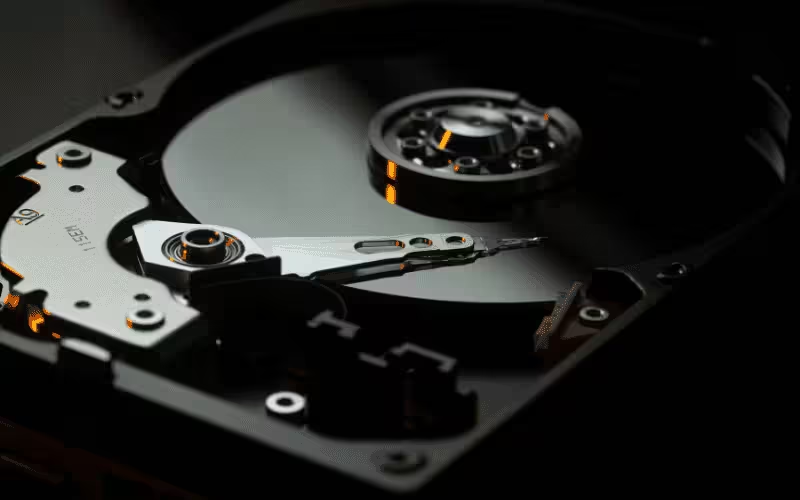
Our iMac data recovery includes:
Our Approach to iMac Storage Failures
Recovering an iMac starts with understanding exactly which storage architecture Apple shipped inside it, because the right method differs enormously between generations.
On Fusion Drive models we treat the hard drive and the SSD as two halves of a single logical volume, imaging both before reassembling the file system — because losing either half incorrectly can compromise the whole. Mechanical hard drive failures are handled with imaging techniques that minimise stress on degraded platters and heads. For T2 and Apple Silicon iMacs, we are straightforward with you: the internal storage is encrypted by hardware, so recovery depends on the machine's security components remaining functional and on you holding the login or FileVault credentials. Where those conditions are met, there is a path; where they are not, we say so before you spend a cent.
Matching the method to the machine is what separates a real recovery attempt from an expensive guess.
Built for iMacs. Engineered for Every Storage Generation.
From ageing 21.5-inch models with spinning drives to current Apple Silicon machines, we plan recoveries around the hardware in front of us.
Whichever era your iMac belongs to, its data deserves a recovery plan designed for that exact hardware.
Your Data, Protected. Guaranteed.
We safeguard and recover your data with clear pricing and a no-risk promise on recovery work.




Your data stays backed up, secure, and recoverable when you need it most.
Request a Free QuoteWhat an iMac Recovery Returns to You
The measure of success is simple: the files you feared were gone, back in usable form and organised the way you remember them.
We review the recovered file set with you before invoicing, so you always know precisely what you are paying for.
The iMac Recovery Process
Whether your iMac comes into our Sydney workshop or ships to us from elsewhere in Australia, it moves through a deliberate, documented sequence.
iMac Recovery Services
Fusion Drive Recovery
Recovery for iMacs where either half of the Fusion pair has failed, splitting a single volume across broken hardware.
Includes:
- SSD and HDD paired imaging
- Logical volume reassembly
- Partial-pair reconstruction
- CoreStorage and APFS handling
- Full volume extraction
Failed Hard Drive Recovery
Mechanical recovery for the spinning drives fitted to most pre-2020 iMacs, from bad sectors to head failures.
Includes:
- Clicking and grinding drive triage
- Degraded platter imaging
- Bad sector management
- Firmware fault handling
- Sector-level data extraction
SSD, T2 and Apple Silicon iMacs
Assessment and recovery for flash-based iMacs, with honest guidance on what hardware encryption allows.
Includes:
- Internal SSD diagnostics
- T2-era recovery assessment
- Apple Silicon storage evaluation
- FileVault credential guidance
- Boot repair for data access
Deleted File and Volume Recovery
Recovery of files that were deleted, or volumes that were erased or corrupted, on otherwise healthy iMac storage.
Includes:
- Deleted file recovery
- Erased volume reconstruction
- APFS snapshot examination
- Corrupted directory repair
- Targeted file-type searches

Why Trust NexusByte With Your iMac
- Deep familiarity with Apple storage architectures
- Imaging-first workflow that protects fragile drives
- Clear, jargon-free communication
- Fixed pricing agreed in advance
- No Fix, No Fee across every iMac job
- Sydney-based with Australia-wide reach
Your iMac holds years of your life or your business — it deserves better than trial-and-error recovery.
What Is iMac Data Recovery?
iMac data recovery is the retrieval of files from an iMac or iMac Pro that will not start, has lost a volume, shows a flashing question mark, or has developed a failing internal drive. Because iMacs tend to sit on a desk for years doing the same job, they often hold the longest-running archive in the house or office — a family photo library, or a business's accounts going back a decade.
They also fail differently from laptops. An iMac is rarely dropped or spilled on; what kills the data is usually age, heat and a drive that has quietly been deteriorating for months behind a sealed display.
The Fusion Drive Problem
Many iMacs from 2012 through 2020 shipped with a Fusion Drive: a small SSD and a large hard disk joined by software into what looks like one volume. macOS moves data between them automatically, and neither half holds a complete, usable copy on its own.
When either half fails, the logical volume breaks and the Mac stops booting — and this is where recovery gets genuinely tricky. Reading only the surviving disk gives you fragments of files rather than files. Both halves have to be imaged and the pairing reconstructed before anything meaningful can be extracted, which is why a Fusion Drive job takes longer than a single-drive one.
It is also why a failed Fusion Drive should never be “repaired” with Disk Utility on a hunch. Splitting or rebuilding the set writes to both halves and can turn a recoverable case into an unrecoverable one.
Getting Inside an iMac
Every iMac since 2012 has its display bonded to the chassis with adhesive strips, so reaching the drive means cutting the screen free and re-sealing it afterwards with fresh adhesive. It is a controlled procedure with the right tools and a genuinely damaging one without — cracked glass and torn display cables are the usual results of a first attempt at home.
That is worth knowing before you decide whether to open it yourself. On a machine holding a decade of photos, the cost of a slipped tool is considerably higher than the cost of the recovery.
Warning Signs Your iMac Drive Is Failing
- The spinning beachball on ordinary tasks, especially when opening folders or saving.
- A boot that takes minutes rather than seconds, or stalls partway through the progress bar.
- Clicking or repeated soft ticking from inside the case — mechanical drives only, and a reason to stop immediately.
- Files or folders that vanish, or Photos reporting a damaged library.
- A flashing question mark at startup, or the machine only booting into Recovery.
If the drive is making noise, switch the machine off and leave it off. Every additional minute of a failing mechanical drive spinning is more of the surface you may not get back.
What Happens Next
We open the display properly, remove and image the drive — both halves on a Fusion set — and work only from those copies. Where the machine is a T2 or Apple Silicon iMac, the storage is soldered and encrypted to its own board, which follows the same path as a modern MacBook recovery.
Assessment is free, the quote is fixed before work starts, and if nothing usable is recovered there is nothing to pay. Where possible we also return the machine with a healthy replacement drive so it goes back to work rather than to landfill.
Service Coverage
Data Management & Recovery Service Areas
We provide Data Management & Recovery Services across Sydney and surrounding areas within a 60km radius
Eastern Suburbs
Bondi, Coogee, Randwick, Maroubra, Double Bay, Bondi Junction, Bronte, Tamarama, Dover Heights, Rose Bay, Vaucluse, Waverley, Woollahra, Paddington
Inner West
Newtown, Marrickville, Petersham, Leichhardt, Balmain, Dulwich Hill, Stanmore, Annandale, Glebe, Camperdown, Enmore, Burwood, Ashfield, Croydon, Five Dock, Drummoyne, Concord
Sydney CBD Area
Sydney CBD, Surry Hills, Darlinghurst, Kings Cross, Pyrmont, Ultimo, Chippendale, Redfern, Waterloo, Zetland, Alexandria, Erskineville, Newtown
City of Sydney
Lower North Shore
North Sydney, Crows Nest, St Leonards, Neutral Bay, Kirribilli, Milsons Point, Chatswood, Willoughby, Artarmon, Naremburn, Lane Cove, Greenwich, Wollstonecraft, Mosman, Cremorne, Spit Junction
Upper North Shore
Hornsby, Waitara, Wahroonga, Turramurra, Pymble, Gordon, Killara, Lindfield, Roseville, Asquith, Mount Colah, St Ives, Warrawee
Hornsby Shire Council, Ku-ring-gai Council
Northern Beaches
Manly, Dee Why, Freshwater, Curl Curl, Narrabeen, Collaroy, Avalon, Palm Beach, Mona Vale, Warriewood, Brookvale, Seaforth, Balgowlah
Northern Beaches Council
Ryde District
Ryde, Eastwood, Denistone, West Ryde, Macquarie Park, Marsfield, Meadowbank, Putney, Gladesville, Hunters Hill
City of Ryde
Parramatta Region
Parramatta, Westmead, Wentworthville, Granville, Merrylands, Guildford, Auburn, Lidcombe, Rosehill, Harris Park, Rydalmere, Ermington, Northmead
Hills District
Castle Hill, Baulkham Hills, Kellyville, Bella Vista, Rouse Hill, Winston Hills, North Rocks, Westleigh, Beaumont Hills, Cherrybrook
The Hills Shire Council
Blacktown Area
Blacktown, Mount Druitt, Rooty Hill, Seven Hills, Toongabbie, Quakers Hill, Kings Langley, Glenwood, Stanhope Gardens, Schofields
Blacktown City Council
Liverpool Region
Liverpool, Cabramatta, Fairfield, Green Valley, Warwick Farm, Chipping Norton, Prestons, Casula, Wattle Grove, Hammondville
Liverpool City Council
Fairfield Area
Fairfield, Cabramatta, Canley Vale, Carramar, Lansvale, Villawood, Wetherill Park, Bonnyrigg, Edensor Park, Smithfield
Fairfield City Council
Canterbury-Bankstown
Bankstown, Campsie, Canterbury, Belmore, Lakemba, Wiley Park, Punchbowl, Greenacre, Condell Park, Revesby, Padstow, Panania
Strathfield District
Strathfield, Homebush, Flemington, Homebush West, North Strathfield
Strathfield Council
Sutherland Shire
Cronulla, Miranda, Sutherland, Caringbah, Engadine, Gymea, Woolooware, Taren Point, Sans Souci
Sutherland Shire Council
St George Area
Hurstville, Kogarah, Rockdale, Banksia, Arncliffe, Bardwell Park, Beverly Hills, Mortdale, Oatley, Peakhurst, Penshurst
Penrith Region
Penrith, St Marys, Kingswood, Werrington, Cambridge Park, Jamisontown, Emu Plains, Glenmore Park, Orchard Hills
Penrith City Council
Macarthur
Campbelltown, Ingleburn, Minto, Leumeah, Rosemeadow, Narellan, Camden, Mount Annan, Appin, Elderslie
Campbelltown City Council, Camden Council
Don't see your suburb or area? We're expanding our service coverage across Sydney.
Request Service in Your AreaLatest Data Management & Recovery & Technology Insights





What our clients say about our comprehensive IT services
Laith was amazing! Very responsive, communicates properly, provides regular updates and explains everything so thoroughly! Will definitely be using your services in the future!
I'm really happy with my website. The Sheriff Building Inspections made the whole process easy and stress-free. They listened to what I wanted, gave me good ideas, and the end result looks clean, modern, and professional. They were quick to reply to my questions and kept me updated the whole way through. The site works great on mobile and is easy for my clients to use. Honestly, it turned out even better than I expected. Big thank you layth.
Absolutely stoked with Laith from Nexus Byte 👏 He built my dream website from scratch and honestly made the whole process so easy. From the first chat to the final launch, he was patient, clear, and actually listened to what I wanted – then made it look even better than I had in mind. Any time I had a question or a random idea, he was onto it straight away and explained everything without any tech jargon. You can tell he genuinely cares about the end result and about helping your business look professional online. Couldn't be happier with the site and the support along the way. 5 stars from me, highly recommend Laith and Nexus Byte to anyone needing a website done properly. ⭐⭐⭐⭐⭐
NexusByte built my website and did an amazing job. The whole process was super smooth, they were easy to talk to, quick to reply, and really listened to what I wanted. The final site looks clean, modern, and exactly how I pictured it. I'm honestly really happy with how everything turned out. Definitely recommend working with them!
Amazing service by Laith. Clear up front costing, really helpful to work with, and thorough in getting the job done right. I'd definitely use him and NexusByte again.
Laith went out of his way to fix my dad's computer when everything was closed. He came home and spared my dad the trouble of travel
Laith was reliable, helpful and professional - will be recommending.
Absolutely recommend NexusByte and will be first point of contact for any future hardware support and fix services, and hopefully dealing once again with Laith. The entire process was an A+ experience from the moment the call was answered, through to the diagnostic, repair and return of the damaged laptop. Laith is fantastic. In every element of his service and support. Very personable, engaging, knowledgeable and understands the critical importance of service to customers. He provided clear information for every step from booking the appointment, was on time for visiting my home for diagnosis + collection and for return of the item (on a weekend!), for what to expect through the diagnostic works, and for the quoting and payment process. The price for the services provided was very reasonable and affordable. One of the best service experiences I have had and right from 'go'.
We worked with Laith and the NexusByte team to design and build our new website and the experience was excellent from start to finish. Laith took the time to understand our brand and delivered a fantastic UI/UX that perfectly matches our company's look and feel. The website is modern, clean, and extremely easy to navigate. It's also fully responsive and works flawlessly across all screen sizes, from mobile to desktop. Communication throughout the project was clear and professional, and everything was delivered exactly as promised. We're very happy with the final result and would highly recommend NexusByte to anyone looking for high-quality web design and development.
We have been working with NexusByte to manage our business IT infrastructure, and the experience has been excellent. Their team is highly knowledgeable, responsive, and professional in handling both routine maintenance and unexpected technical issues. NexusByte took the time to understand our business requirements and implemented reliable solutions that improved the stability, performance, and security of our systems. Their proactive approach to monitoring and maintenance has significantly reduced downtime and ensured our operations run smoothly. Communication has always been clear and timely, and any issues are addressed quickly and efficiently. It gives us great peace of mind knowing our IT environment is being managed by a team that genuinely cares about reliability and long term performance. We would highly recommend NexusByte to any business looking for dependable and professional IT support.
I'd like to thank the team at Nexus Byte team for the amazing work they did on our website, especially Laith for his support and professionalism throughout the process. From start to finish, the team was responsive, easy to work with, and truly committed to delivering great results.
Highly recommended, they go out of their way to provide old fashioned service
Laith did a great job on upgrading my iMac so I don't have to buy a new model. Very knowledgeable about all things IT. 👍
I am so grateful of Laith's assistance today during a difficult and stressful time. Laith from NexusBytes is so knowledgeable, patient and compassionate. He was so calm which reassured me that I had found the right person. It took Laith only minutes to find the problem with my laptop and address it so that I could go safely back to work. I cannot recommend Laith and NexusBytes enough. I have already put his contact details in my phone for the next time I need tech help! Thank you Laith. Tracey
Amazing service. Job done, Lovely staff - highly recommend
Laith from Nexus Byte was fantastic from start to finish. He fixed my Sonos internet connectivity problem where others had tried and failed. I particularly liked that he contacted me the day after his service call to check that everything was still OK with my system. I would not hesitate to recommend Laith's services. Thanks again. Paul
The team at NexusByte are absolutely unreal! Laith and Natalie went above and beyond to help me with my repair/upgrade, and looked for the most cost effective options to suit my needs. They were both very communicative, knowledgeable and super flexible with pick-ups times. Just outstanding customer service all round. Thanks guys!
Frequently Asked Questions
Let's Protect and Take Control of Your Data
Need dependable backups, fast recovery, or a smarter way to manage your data? Our Sydney data specialists keep your information safe, organised, and recoverable when it matters most. Get in touch for a free data assessment.
Make an Appointment
Get in touch with us today. We'll respond to your inquiry within 2 business hours.
