

Apple iMac Repair Services in Sydney
When your iMac starts failing, you want an iMac repair specialist in Sydney who treats the machine the way Apple intended it to run. NexusByte delivers professional iMac repair for Sydney businesses and home users alike, backed by technicians who diagnose the actual fault rather than masking symptoms with quick fixes that never last.
Our workshop handles the full spectrum: iMac display replacement, hard drive and SSD upgrades, RAM upgrades and complete system diagnostics for machines that are slow, unstable or simply not turning on. Every job is fixed properly, not temporarily, so the repair holds up under real daily workloads instead of failing again a few months down the track.
From dead pixels on a 5K display to a machine that refuses to boot, every repair is handled by an iMac specialist who values your time and your data. Book with NexusByte and work with a Sydney team built around accuracy, speed and long-term reliability on every job.
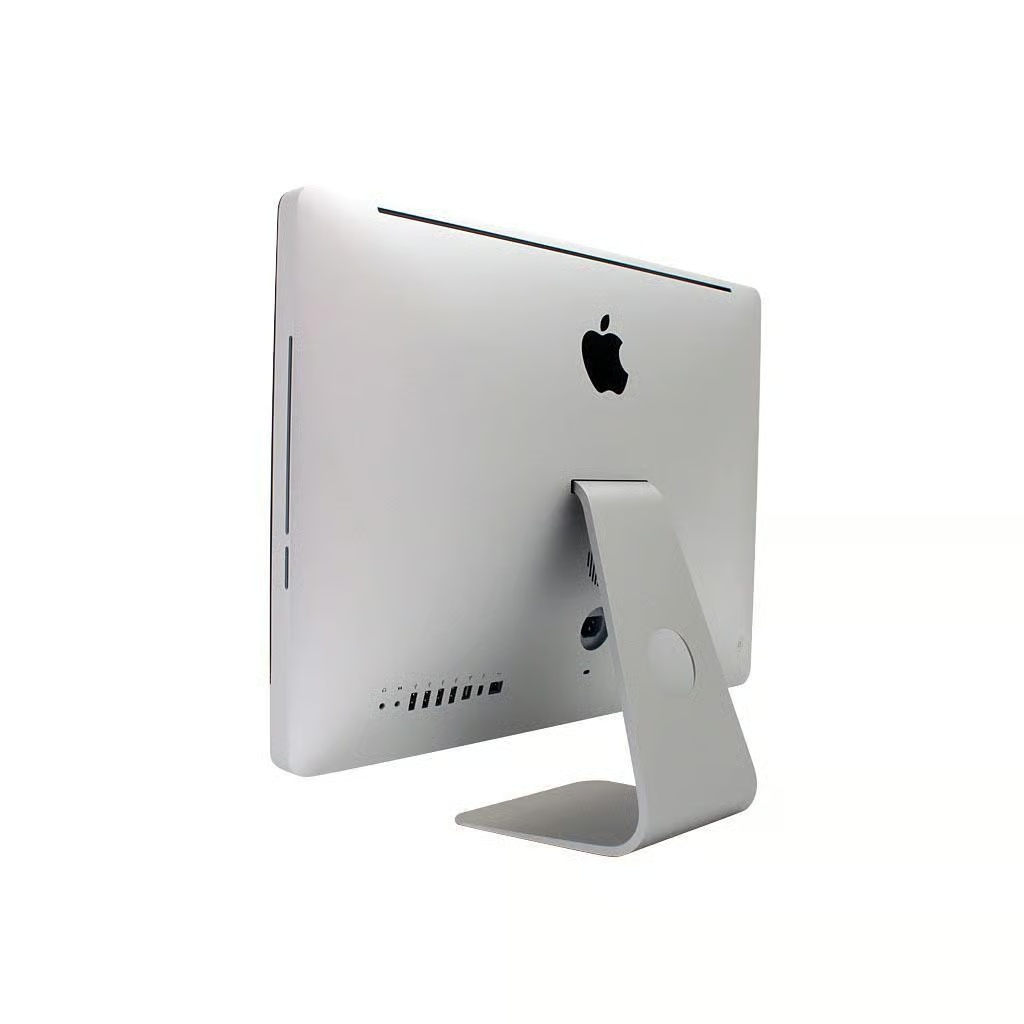
Our iMac repair services include:
Display replacement and repairHard drive and SSD upgradesRAM upgrades and full diagnosticsPickup and drop-off for busy professionals
Trusted Apple iMac Repair Specialists in Sydney
NexusByte provides professional iMac repair services for all Apple desktop models.
We support iMac 24", iMac 27", iMac Pro and all Intel and Apple Silicon models with quality parts, experienced technicians, and clear pricing. We do not upsell. We diagnose first, then repair.
Genuine and OEM-grade Apple parts
Experienced iMac repair technicians
Display and logic board specialist knowledge
Repairs designed for long-term reliability
Clear communication at every step
Secure handling of your data
Sydney-based iMac specialists you can trust.
Built for Apple. Engineered for Reliability.
NexusByte provides professional iMac repair services for all Apple desktop models across Sydney.
iMac 24" and 27"
iMac Pro
Display replacement
SSD and RAM upgrades
Logic board repair
Full system diagnostics
Every iMac repair is completed with quality parts and a clear diagnosis.
Our promise on every iMac repair
iMacs are sealed units, so opening one for a drive, fan or display fault is a job for someone who does it often. We diagnose first, quote the whole repair in writing, and only proceed on your go-ahead.
Free Diagnostic

Fixed Quote

No Fix, No Fee

Same Day Service

Your iMac comes back tested, with the fault explained in plain words.
Request a Free QuoteBuilt for results
What Our Clients Say
Sydney businesses and individuals trust NexusByte for iMac repair because we fix issues properly the first time.
Honest diagnostics
Fast turnaround
Clear pricing
Reliable outcomes
Clients value our commitment to quality and transparency.
Our iMac Repair Process
A simple, transparent process designed to reduce downtime.
1. Diagnosis
2. Clear Quote
3. Professional Repair
4. Testing & Quality Check
5. Collection or Delivery
6. Documentation & Warranty
Our iMac Repair Services in Sydney
iMac Display Repair & Replacement
Broken, faulty iMac display repair and replacement for all models.
Includes:
- Cracked iMac screen repair
- Display flickering
- Dead pixels
- iMac 5K display replacement Sydney
Hard Drive & SSD Upgrades
We specialise in iMac storage upgrades and replacement.
Includes:
- Fusion Drive replacement
- SSD upgrade
- Hard drive failure
- iMac storage upgrade Sydney
RAM Upgrades
iMac RAM upgrades for improved performance and multitasking.
Includes:
- RAM upgrade for iMac
- Memory upgrade
- Slow performance fix
- iMac RAM upgrade Sydney
Logic Board & Power Issues
If your iMac is not turning on or not booting, we diagnose the full system.
Includes:
- iMac not turning on
- Logic board diagnostics
- Power supply failure
- Boot failure repair
Cooling & Thermal Repairs
Overheating and fan issues affect performance and longevity.
Includes:
- iMac overheating
- Fan replacement
- Thermal paste replacement
- Loud fan noise
Data Recovery & macOS
Professional iMac data recovery and macOS installation.
Includes:
- Recovery from failed drives
- Data recovery from unbootable iMacs
- macOS installation
- Recovery mode support

Why Choose Us
Why NexusByte for iMac Repair Services
- Experienced iMac repair technicians
- Display and logic board specialist knowledge
- Repairs designed for long-term reliability
- Clear communication at every step
- Secure handling of your data
- Sydney-based support you can trust
Genuine and OEM-grade parts for every iMac repair.
What Is an iMac Repair Service?
An iMac repair service diagnoses and fixes faults in Apple's all-in-one desktop computers — displays, storage drives, RAM, logic boards, power supplies and cooling systems. It's for Sydney home users and businesses whose iMac is running slowly, overheating, showing screen faults or refusing to turn on, and who want it repaired properly rather than replaced.
iMacs are built differently from ordinary desktop towers. The display, logic board and storage all live inside one sealed enclosure, and on modern models the screen is bonded to the chassis with adhesive that has to be cut and reapplied correctly. That's why iMac repair is genuinely specialist work — a careless opening can turn a simple hard drive swap into a cracked panel and a far bigger bill.
NexusByte handles the full range, from iMac 5K display replacement through to logic board diagnostics and power supply faults, as part of our broader computer repair services for Sydney.
Common iMac Problems and What's Usually Behind Them
Most iMacs that reach our bench show one of a handful of recurring faults. Knowing the likely cause helps you judge how urgently to act.
- Screen flickering, lines or dead pixels — often a display cable, panel fault or graphics issue; proper diagnosis isolates which one before any parts are ordered
- Painfully slow performance — usually an ageing hard drive or Fusion Drive that is overdue for an SSD
- iMac not turning on — commonly a failed power supply, though logic board faults can produce the identical symptom, which is why we test the whole power path
- Loud fans and overheating — dust build-up and dried-out thermal paste, which quietly shortens component life if left alone
None of these faults improve on their own. A failing drive in particular deteriorates a little more every time the machine powers on, so if your iMac is slowing down and making unfamiliar noises, back up immediately and book a diagnosis before the job becomes a data recovery exercise instead of a repair.
How Much Does iMac Repair Cost in Sydney?
The honest answer is that it depends on the model and the fault. A RAM upgrade on an older 27-inch iMac is a very different job from a 5K display replacement, and logic board work varies with the nature of the failure. Screen size, model year, parts availability and whether your data needs to be preserved along the way all influence the final figure — which is why any shop quoting one price for every iMac should make you cautious.
Our process is built around removing that uncertainty: diagnosis first, then a clear quote before any work begins. You'll know exactly what the repair involves and what it will cost, and you decide whether to proceed. No surprises when you come to collect the machine.
Should You Repair, Upgrade or Replace Your iMac?
A slow iMac is not necessarily a dying iMac. If the machine still handles your workload but takes forever to boot and open applications, an SSD and memory refresh through our computer upgrades service can often transform it for a fraction of the cost of a new machine.
Repair makes sense when the fault is isolated — a display, a power supply, a drive — and the rest of the machine has years left in it. Replacement becomes the sensible option when several major components are on their way out at once. We'll tell you plainly which situation you're in, because a repair designed for long-term reliability is only worth doing on a machine with a future.
If you do end up replacing it, our computer setup and data transfer service moves your files, email and settings across so the new Mac feels like your old one — minus the problems.
How to Prepare Your iMac for Repair
If the machine still boots, back up before your appointment — Time Machine to an external drive is ideal. Jot down the symptoms you've noticed, when they started and whether anything seemed to trigger them; a good symptom history genuinely shortens diagnosis time.
Have your login password ready, and if FileVault encryption is switched on, know your recovery details — an encrypted drive we can't unlock limits how thoroughly we can test. If the iMac won't start at all, resist the urge to keep restarting it; repeated power cycles can make a failing drive worse.
We offer pickup and drop-off across Sydney for busy professionals, so a bulky all-in-one never has to travel on your back seat. Every job finishes with testing, a quality check and warranty documentation, so you know exactly what was done. Book your iMac repair and we'll take it from there.
Our Insights
Latest Computer Repairs & Technology Insights



Client Reviews
What customers say about our repair work
Three of the reviews our clients have left on Google. The full set, as written, is on our reviews page.
The entire process was an A+ experience from the moment the call was answered, through to the diagnostic, repair and return of the damaged laptop. Laith is fantastic. In every element of his service and support.
Highly recommended, they go out of their way to provide old fashioned service
Laith did a great job on upgrading my iMac so I don't have to buy a new model. Very knowledgeable about all things IT. 👍
FAQs
Frequently Asked Questions
Do you offer iMac repair services near me in Sydney?
Can you upgrade iMac storage and RAM?
Do you repair iMac display issues?
How long do iMac repairs take?
Can you recover data from a failed iMac?
Do you repair iMac 5K and Apple Silicon iMacs?
Get in touch
Give your iMac a second life
Book an iMac diagnosis and we will tell you whether a screen, drive or memory repair makes sense against a new machine, with a fixed quote and a warranty on the work.
Book onlineNot ready to book? Ask a question and we reply within two business hours.