Guest Wi-Fi, EFTPOS and Staff on One Network
In most small business premises, everything is on one network. The staff laptops, the payment terminals, the printer, the cameras, the smart thermostat, the customer sitting in reception on the guest password taped to the wall — all of it sharing one flat space where, by default, every device can reach every other device.
This is not the result of a decision. It is what you get when a network grows by adding things to it, which is how nearly every small business network is built. It works perfectly well, right up until it does not.
What "flat" actually means in practice
On a flat network there is nothing between devices. The tablet a customer just joined to your guest Wi-Fi can see your file server. The security camera with firmware from 2019 can reach the accounts PC. The contractor's laptop, which you know nothing about, sits alongside the terminal that processes card payments.
Nothing has to go wrong for this to be true — it is true right now, on a normal Tuesday. The problem is what happens when one device is compromised.
Attacks rarely land on the valuable thing directly. They land wherever is easiest: a staff member clicking a convincing invoice, an unpatched camera exposed to the internet, a device someone brought from home. From there the attacker moves sideways looking for something worth having. On a flat network that movement is trivial, because the network was built to let everything talk to everything.
Segmentation does not stop the initial compromise. It contains it. The difference between one infected laptop and a business-wide ransomware event is very often whether the network let the problem spread, which is why it sits alongside endpoint protection rather than instead of it.
The groups that should be apart
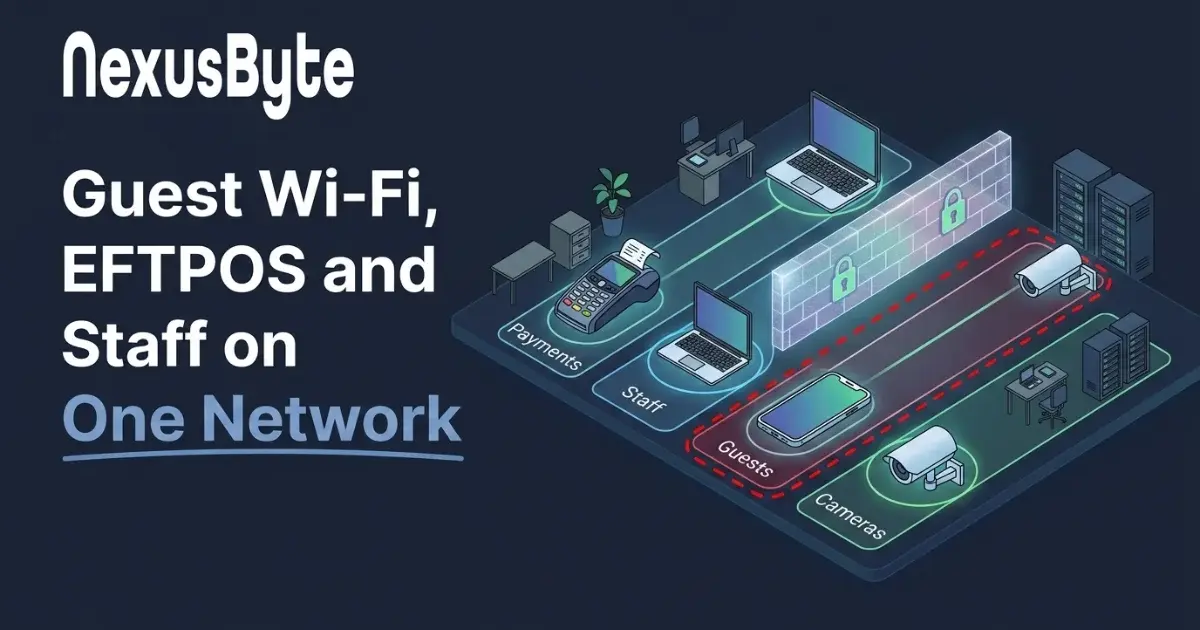
You do not need dozens of segments. For most small businesses, four or five groupings cover it:
- Payment terminals. The clearest case. Card processing should sit on its own segment with tightly limited traffic. If you handle cards, PCI DSS expects this, and it is one of the first things assessed.
- Staff devices and business systems. The working network — laptops, desktops, file storage, printers, line-of-business applications.
- Guest access. Internet only, with no route to anything internal. Customers, visitors, contractors and personal phones all belong here.
- Cameras, door access and building services. These are computers with an operating system and a network stack, frequently unpatched and often built with security as an afterthought. Give them their own space and let nothing else reach them.
- Voice, if you run desk phones, which benefit from being separated for quality reasons as much as security ones.
The test for each group is simple: does anything in this group have a legitimate reason to open a connection to anything in that group? Usually the answer is no, and where the answer is yes, it is a specific rule rather than blanket access.
How this is actually done
The mechanism is a VLAN — a virtual LAN — which lets one set of physical cables and switches carry several logically separate networks. Traffic on one cannot reach another unless a router or firewall is explicitly configured to permit it.
What you need:
- A managed switch. The unmanaged switches sold for home use cannot do this. Managed switches are no longer expensive, and this is the main hardware requirement.
- A router or firewall that understands VLANs and can apply rules between them — a business-grade unit rather than a consumer router, which is where firewall and network protection starts.
- Access points that support multiple SSIDs mapped to VLANs, so your guest and staff wireless are genuinely separate networks rather than two passwords into the same space.
Many businesses already own equipment capable of all this and have simply never had it configured, because it works without it. Where the hardware is consumer-grade, the upgrade is usually modest against the risk it addresses.
Guest Wi-Fi is where this most often goes wrong
The single most common finding when we assess a small business network is guest Wi-Fi that is not actually a guest network. Sometimes it is the same network with a second password. Sometimes it is a "guest" mode on a consumer router that isolates clients from each other but still routes into the internal network. Occasionally the guest password is the staff password.
Proper guest access has three properties: it reaches the internet and nothing else, it cannot see other guest devices, and it has a bandwidth ceiling so one visitor streaming does not degrade your trading systems. Anything less is a door into your business with a password written on a card by the till.
Worth extending the same thinking to staff phones. Personal devices on the business network is a category of risk nobody manages; personal devices on guest is a category of risk that no longer matters. Where phones do need real access, that belongs under user and device management rather than an open password.
Doing it without stopping trading
The fear that holds this back is disruption, and it is a reasonable one — this touches everything. It does not have to be done in a single weekend.
A sensible order:
- Inventory first. You cannot segment what you have not identified. Find every connected device, including the ones nobody remembers installing — a digital security check is often how businesses discover what is actually on their network. This is frequently the most revealing part of the exercise.
- Start with guest. It is the highest risk, the easiest to separate, and nothing internal depends on it. If you do only one thing, do this.
- Then the devices nobody logs into — cameras, door controllers, building services. Low disruption, because they are set-and-forget by nature.
- Then payments, planned around trading hours, with the provider consulted if the terminals have specific requirements.
- Staff systems last, since this is where the exceptions live and where a mistake is most visible. Expect to discover undocumented dependencies here, and allow for it.
Document what you build. A segmented network that nobody understands becomes an obstacle a year later, when someone needs to add a device and cannot work out where it goes — at which point the temptation is to put it back on the flat network and undo the whole exercise.
What it is worth
Segmentation is unglamorous. It prevents incidents that, done well, you never hear about, which makes it a hard thing to feel good about paying for.
The way to weigh it is by consequence. If ransomware reached every device on your network tomorrow, what would that cost in downtime, recovery, lost data and lost customers? Segmentation is one of the few controls that changes that outcome rather than merely lowering the odds — it is the difference between recovering one machine and recovering a business. It also happens to be a control that insurers and larger clients increasingly ask about.
If you would like to know how your current network is actually arranged, our Sydney team can map what you have, identify what can reach what, and stage the changes around your trading, through managed network services. It sits alongside the wider question of how your systems are looked after day to day, which we cover in managed IT versus break-fix.